Guide · Screenshots taken 2026-07-04
Set Up Alipay Before You Fly
China runs on two payment apps, and Alipay is the one built for visitors: English interface, foreign cards accepted, and a travel toolkit (rides, trains, transit codes) bundled in. Set it up at home in 15 minutes and you'll never fumble for cash. Every screenshot below is from a real setup run — not marketing images.
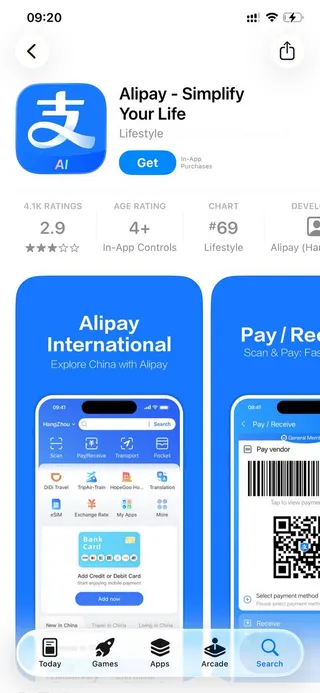
Download Alipay before you fly
Search “Alipay” in the App Store or Google Play — the blue icon with the 支 character. Install it at home on good Wi-Fi: if you download it outside China, the app automatically runs the international version with English as the default language. Ignore the middling star rating; this is the app 900 million people pay with daily.
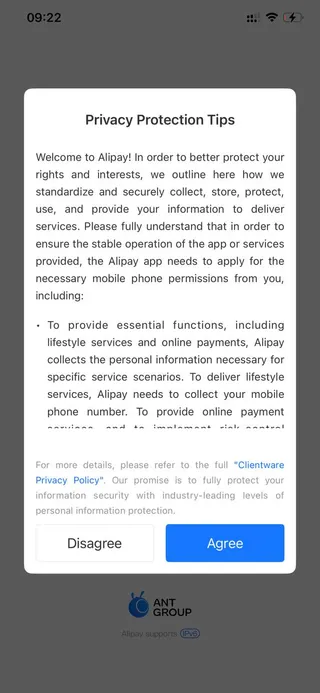
Accept the privacy prompt
On first launch you'll see a Privacy Protection Tips popup. Tap Agree — the app can't run without it. This is standard for Chinese apps and covers the permissions Alipay uses for payments.
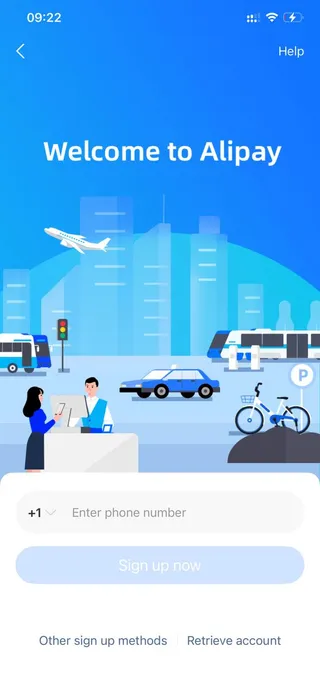
Sign up with your home phone number
Tap the country-code selector (it defaults to +1), pick your own country, and enter your normal mobile number — you do not need a Chinese number. You'll receive an SMS verification code; enter it to continue.
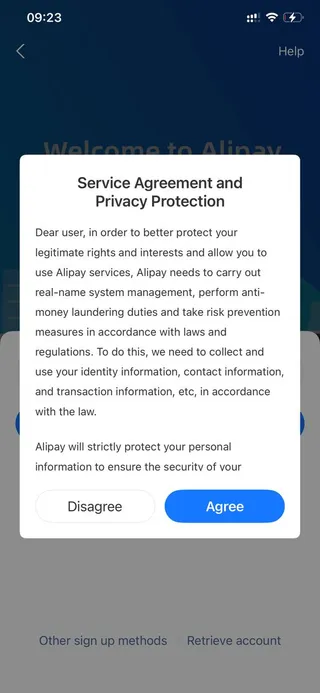
Agree to the service terms
A second popup covers the service agreement — Chinese law requires real-name verification for payment apps, which is why Alipay will later ask for your passport if you want higher limits. Tap Agree.
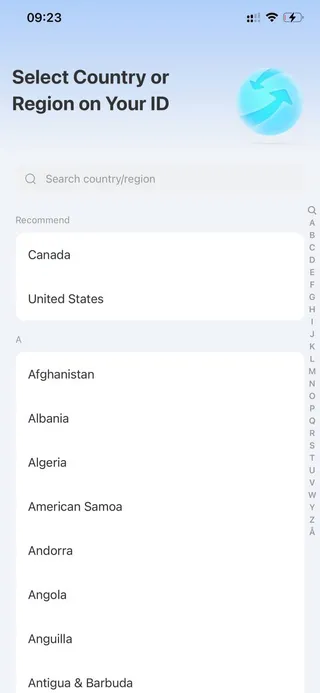
Select the country on your ID
Choose the country that issued your passport (not the country you're flying from). This determines which documents Alipay will accept if you verify your identity later.
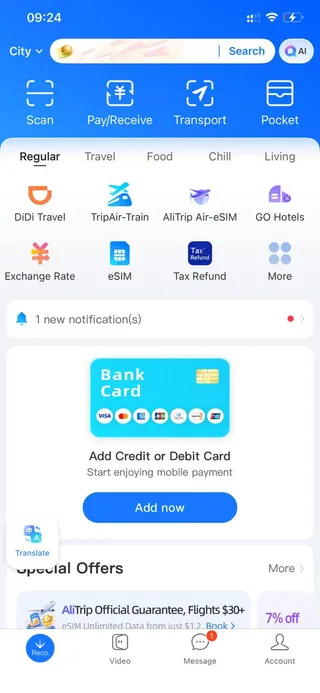
You're in — this is home base
The home screen is a mini travel toolkit: DiDi ride-hailing, train tickets, hotel booking, eSIM top-ups, currency rates, and tax refunds all live inside Alipay. The big blue Bank Card banner is your next stop.
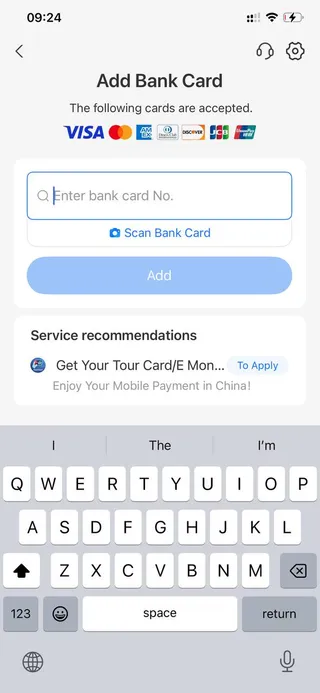
Link your foreign card
Tap Add now → enter your card number (or scan the card with your camera). Visa, Mastercard, American Express, Discover, JCB, and UnionPay are all accepted. You'll confirm expiry, CVV, and billing name — the same as any online checkout.
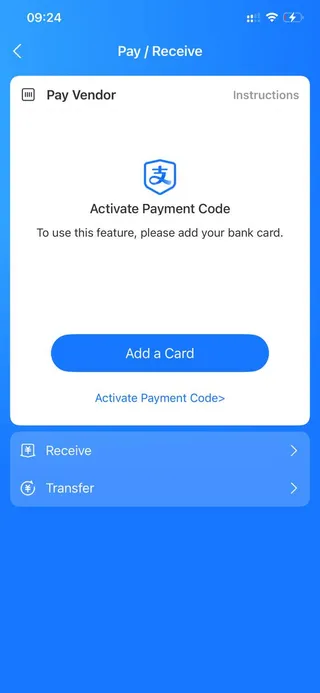
Activate your payment code
Open Pay/Receive from the home screen. Once a card is linked, tapping Activate Payment Code turns on the barcode/QR that cashiers scan. This is how you'll pay at 90% of shops: show the code, they scan, done.
Bonus: free transit codes for metro and bus
In the Transport section, claim the transit card for whichever city you're in — it generates a QR code you scan at metro gates and bus readers, charged straight to your linked card. No physical transit card, no ticket machines, no exact change.

When setup fights back
Four snags account for nearly every stuck Alipay setup. Fixes, in order of likelihood. (Already set up, and it's payments themselves that are failing? That's a different set of causes — see why Alipay isn't working, covering declines, frozen accounts, fees and limits.)
The SMS code never arrives
Check the country-code selector first — it quietly defaults to +1, and a European number behind a +1 prefix goes nowhere. Then give it a full minute and tap Resend; codes from Chinese short-numbers can crawl. Still nothing? Some carriers filter international short-code SMS — retry later or ask your carrier to unblock international SMS.
Your card gets rejected at the linking step
Nine times out of ten this is your bank, not Alipay: the verification charge comes from an unfamiliar Chinese merchant and the fraud filter eats it. Approve the attempt in your banking app (or pre-authorize international transactions), then retry. Virtual and prepaid cards fail far more often than standard cards — if you have both, lead with the physical Visa or Mastercard credit card.
It's asking for your passport
That's the real-name verification from step 4 — Chinese payment law, not a scam. You can skip it and still pay under the lower limits (US$500 per transaction), but a two-minute passport upload lifts them to US$5,000. Do it from the hotel Wi-Fi, not in a checkout queue.
The app opened in Chinese
You downloaded it inside China or with a Chinese app-store region, so you got the domestic version. Switch the language: tap 我的 (bottom right) → 设置 → 通用 → 多语言 → English. If menus still look wrong afterwards, reinstall using your home app-store account — the international version comes up in English on its own.
Frequently asked questions
- Do I need a Chinese phone number or bank account?
- No. Register with your home phone number and link your regular Visa, Mastercard, Amex, Discover, JCB, or UnionPay card. A Chinese bank account is never required for tourists.
- What are the spending limits?
- Before identity verification: about US$500 per transaction and US$2,000 per year. Upload your passport in the app (takes ~2 minutes) and limits rise to US$5,000 per transaction / US$50,000 per year.
- What fees will I pay?
- Alipay doesn't charge a fee on typical everyday payments; a small international-card service fee can apply to larger transactions and is shown before you confirm. Your card issuer's foreign-transaction fee (commonly 1–3%) applies as with any overseas purchase — a no-foreign-fee card is ideal.
- Should I set this up before arriving in China?
- Yes — do the download, registration, and card linking at home. The SMS code arrives on your home number, and you'll land in China able to pay for the taxi from the airport.
- What if a shop's scanner can't read my code?
- Some vendors scan you; at small stalls you scan them instead. Tap Scan on the home screen, scan the vendor's printed QR, type the amount, and show the confirmation. Between the two directions, virtually every merchant in China is covered.
Screens and policies current as of 2026-07-04 (Alipay international version, iOS). App flows change with updates — if a screen looks different, the sequence still applies. Tell us if something's outdated.